Built in response to feedback from K-12 technology teams, Cloud Admin helps simplify your everyday administrative work.
You don't have to spend your day hunting through Google Admin console or writing scripts. Manage users, groups, OUs, devices, calendars, Vault, Google Classroom, and more through easy-to-use tools and simpler workflows.
Manage Chromebooks
Manage your district’s Chrome devices at scale without digging through the Google Admin console. Cloud Admin makes it easier to find devices, take bulk actions, and troubleshoot issues quickly.
Move devices between OUs in bulk
Disable, re-enable, reboot, or deprovision devices
Powerwash devices when needed
View device details, health, and auto update expiration dates
Restructure OUs
Keep your Google Workspace organizational structure aligned as your district changes. Cloud Admin simplifies common OU updates so you can reorganize users and resources with fewer steps.
Create new organizational units
Rename existing OUs
Move OUs within your organizational structure
Reorganize parent and child OUs more easily
Bulk Manage Users
Stop making the same account changes one user at a time. Cloud Admin lets you quickly manage individual users or take action across multiple accounts at once.
Create, suspend, unsuspend, or delete users
Move users between OUs in bulk
Reset passwords and manage aliases
Add or remove users from groups and Classrooms
Simplify Google Vault
Make Google Vault searches, investigations, and exports easier to manage. Cloud Admin streamlines common Vault workflows so you can get requested information to the right people faster.
View and create Vault matters
Search Gmail and Drive data
Review holds and previous exports
Export results to Google Drive and share them with authorized users
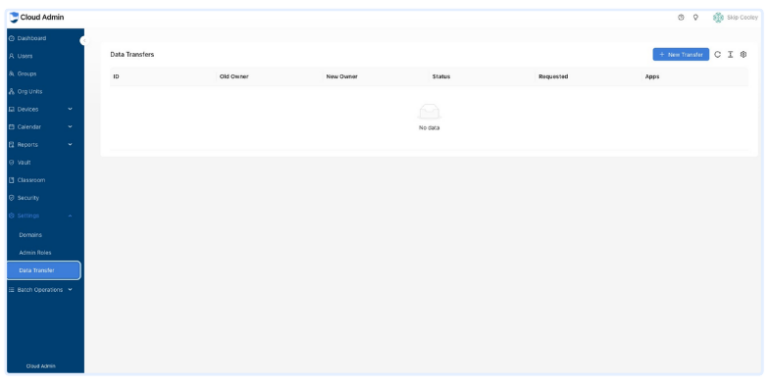
Transfer User Data
Make employee and student account transitions easier when people leave or change roles. Cloud Admin simplifies transferring data between accounts so important information stays with the district.
Select source and destination accounts
Initiate user data transfers in fewer steps
Manage transfers without navigating multiple Google Admin screens
Keep district data accessible when accounts change or are deactivated
You have better things to do than spend hours navigating the Google Admin console.
Complete common Google Workspace tasks through straightforward workflows, make changes across multiple accounts or devices at once, and spend less time figuring out where Google put the setting you need.
Less Time Navigating
Find the users, groups, devices, settings, and information you need without hunting through the Google Admin console.
Less Repetitive Work
Take bulk actions across users, groups, organizational units, devices, and Google Classrooms instead of handling changes one at a time.
Less Reliance On Scripts
Handle common admin tasks without turning every mass update into another GAM command or custom script.
More Time for Higher-Priority Work
Spend less time on routine administration and more time on security, support, infrastructure, and strategic projects.
Cloud Monitor does everything you want and more. The price is amazing, and the amount of time we save has paid for itself many times over. We can keep our students safe while respecting their privacy, shut down phishing attempts, and protect PII all from one platform. For us, it’s a no-brainer.”
Ryan Carlson
Assistant Tech Director, Bureau Valley CUSD #340
"Using Cloud Monitor, we quickly started seeing fewer phishing emails as it became easier for us to properly track who was sending out that email. More importantly, it allowed our staff and students to know that illegitimate emails weren't getting through."
Manny Sanchez
Director of Technology, Azusa Unified School District
“We used Cloud Monitor to pull back a few thousand phishing emails before they were opened. It only took a few minutes, and it helped us prevent further account compromises and stop a serious security incident in its tracks.”
Ryan Roark
Technology Coordinator, Richland County CUSD
“When a phishing attack happens, you have to be really quick. Cloud Monitor makes it easy to identify and isolate the problem right away by putting all the necessary information right in front of your face so you can respond much faster.”
Jonathan Smith
Technology Director, Union County School District
“We had a staff member’s account get compromised, and phishing emails started going out to our entire organization. We were able to go in, revoke all the emails, and delete them quickly. That saved us a ton of time and protected our staff and students from further exposure.”
Cassy Gobin
CTO, Evansville Christian School
“The amount of phishing emails that get through our other filters was a reality check. We simply couldn’t keep up with them in Microsoft, but Cloud Monitor gives us that information and makes it fast and easy to follow up on.”
David Termunde
CTO, Arbor Park School District 145
“We had spam spread into about 600 staff and student accounts. We used Cloud Monitor to quickly remove the email from everyone’s inboxes and set a rule to block it automatically. Unless they were checking emails on a Sunday night, nobody knew what happened.”
Manage The Google Workspace Tasks That Eat Up Your Day
Cloud Admin by ManagedMethods is purpose-built to help make your day easier. Complete Google admin tasks faster without your data ever leaving your domain.
Create, update, and take action on user accounts without jumping between multiple areas of the Google Admin console. View the information you need and manage individual users or make changes in bulk.
Create new users and send account information
Search and filter users by OU
Move, suspend, unsuspend, or delete users individually or in bulk
View two-step verification status
Manage aliases and licenses
Add or remove users from groups and Google Classrooms
View associated calendars and devices
Initiate account data transfers
Review sign-ins, files, app activity, and administrative actions associated with an account
Manage devices individually or in bulk without digging through the Google Admin console. Quickly find the information you need, troubleshoot issues, and take action across your Chromebook fleet.
Take the guesswork out of shared calendar administration. Quickly see who has access, update permissions, transfer ownership, and manage calendar resources.
Reduce the steps between finding the information you need and getting it to the person who requested it. Search, export, and share Vault data through a simpler workflow.
View open and closed Vault matters, and create new matters
Search Gmail and Drive
Estimate the number of matching results before exporting
Review holds and previous exports
Send exported files directly to Google Drive
Automatically share exported files with the appropriate user
Google Classroom environments can get messy fast. Keep your district’s Google Classrooms organized at scale with visibility and bulk-management tools built for technology teams.
View active and archived classrooms
Archive or unarchive classes individually or in bulk
Add students or teachers
Add individual users, entire Google Groups, or organizational units to classes
Authorize Cloud Admin to access the Google Workspace information and administrative functions you need.
Work with real-time Google data
Cloud Admin retrieves information directly through Google APIs rather than relying on cached district data.
Start simplifying everyday tasks
Manage users, groups, devices, calendars, Vault, Classroom, and more through easier workflows.
Works with Plus and Free licenses
Cloud Admin can be used with Google Workspace for Education Fundamentals and paid Workspace editions.
THE OUTCOME
Less Time Administering. More Time For What Matters.
Cloud Admin turns time-consuming Google Workspace administration into faster, more manageable workflows—helping your team spend less time navigating native tools and more time getting work done.
Get Time Back
Spend less of your day on repetitive Google Workspace administration and more time supporting your district’s bigger priorities.
Act Faster
Find the users, devices, groups, settings, and issues you need without bouncing between tools or digging through menus.
Manage at Scale
Turn repetitive one-by-one tasks into bulk actions that make managing thousands of users and devices more practical.
Simplify the Work
Give your team an easier way to accomplish everyday admin tasks without relying on GAM, custom scripts, or specialized expertise.
Improve Consistency
Standardize settings and processes across users, groups, OUs, and devices to reduce errors and keep your domain easier to manage.
Empower Your IT Team
Give your overextended IT team a faster, simpler way to manage Google Workspace at scale and reduce repetitive admin work.
K-12 TECHS TRUST MANAGEDMETHODS
PURPOSE-BUILT FOR EDUCATION
Experience The Difference
Cloud Admin is built around the way K–12 technology teams actually work—with simpler administration, flexible workflows, and tools that help your team get more done without adding complexity.
Cost-Effective
Get powerful Google Workspace administration capabilities designed with K–12 budgets and technology teams in mind.
Easy to Use
Complete everyday administrative tasks through intuitive workflows without relying on GAM expertise or custom scripts.
Customizable
Adapt Cloud Admin to the way your district works, including customizable quick actions and flexible management workflows.
Built for K–12 IT
Designed for realities and challenges of K12 tech teams, from bulk account changes to device and classroom management.
Cloud Admin is a Google Workspace administration solution designed for K–12 technology teams. It simplifies common administrative workflows across users, groups, organizational units, Chrome devices, calendars, Vault, Google Classroom, domains, and more.
Does Cloud Admin replace the Google Admin console?
Cloud Admin is designed to make many of the Google Workspace administrative tasks K–12 IT teams perform most often easier and faster. Some Google Workspace functionality may still require the Google Admin console, and Cloud Admin capabilities will continue to expand over time.
Do I need to know GAM to use Cloud Admin?
No. Cloud Admin gives administrators an interface for performing many common individual and bulk Google Workspace management tasks without requiring GAM commands or custom scripts.
What Google Workspace access is required?
Cloud Admin requires the administrator to sign in using a Google Workspace Super Admin account and authorize the necessary scopes.
Does ManagedMethods store my Google Workspace data in Cloud Admin?
Cloud Admin pulls information from Google's APIs in real time rather than caching the Google Workspace data used for administration. Authorized access expires after 24 hours and requires the administrator to sign in again.
Can I manage Chromebooks with Cloud Admin?
Yes. Cloud Admin provides Chromebook information and supports individual and bulk device-management actions.
Which Google Workspace editions does Cloud Admin support?
Cloud Admin works with Google Workspace for Education Fundamentals as well as paid Google Workspace editions.
What can I do during my 30-day Cloud Admin trial?
Your trial gives you the opportunity to use Cloud Admin with your own Google Workspace environment and explore the administrative workflows most relevant to your district.
See What 30 Days With Cloud Admin Can Save Your Team
The best way to understand the difference Cloud Admin can make is to use it with your own Google Workspace environment.
Start your 30-day free trial and see how much easier it can be to manage users, groups, OUs, Chromebooks, calendars, Vault, Google Classroom, and more.
No GAM expertise required. No need to change the way your district uses Google Workspace. Just a simpler way to get everyday administrative work done.